Ubersuggest Launches Local SEO Checker Tool
Ubersuggest's Local SEO Checker scans a grid of points around a business to show its Google Maps rank, helping businesses understand their local search visibility. This tool is included in every paid plan and uses plan credits.
Original reporting · neilpatel.com
Original: “Local SEO Checker: See Where You Rank on Google Maps at Every Point Around Your Business”
Read “Local SEO Checker: See Where You Rank on Google Maps at Every Point Around Your Business” at Neil Patel →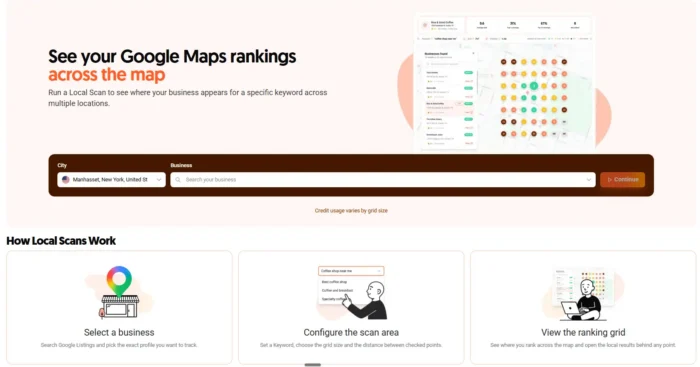
How this was written. Content Catalyst wrote this article with a language model from Neil Patel’s reporting (model: @cf/meta/llama-3.3-70b-instruct-fp8-fast); it describes that reporting rather than adding to it. The original, linked above, is the full story.
Key points from Neil Patel’s report
- Ubersuggest's Local SEO Checker scans a grid of points around a business to show its Google Maps rank.
- The tool helps businesses understand their local search visibility and identify areas for improvement.
- The Local SEO Checker is included in every paid plan and uses plan credits.
- Businesses can use the tool to compare their performance to that of their competitors and identify areas where they need to improve.
- The tool provides a map with color-coded pins indicating the business's rank at each point, as well as four metrics summarizing the scan.
Ubersuggest's Local SEO Checker is a Google Maps rank checker that scans a grid of 9 to 81 points around a business and shows its rank at each point. This tool helps businesses understand their local search visibility and identify areas for improvement.
The Local SEO Checker works by simulating a search from each point's exact location, then plotting the business's rank at every point on a single map. This allows businesses to see which neighborhoods find them and which ones do not. The scan uses public Google Maps results, so businesses do not need to connect or verify a Google Business Profile.
A single rank number cannot describe the complexity of local search results, as a business's rank can change significantly depending on the location of the searcher. The Local SEO Checker provides a more comprehensive picture of a business's local search visibility by showing its rank at multiple points around its location.
The tool is particularly useful for agencies and consultants who need to provide clients with accurate information about their business's performance on Google Maps. By using the Local SEO Checker, businesses can identify areas where they need to improve their local search visibility and develop targeted strategies to reach potential customers in those areas.
To use the Local SEO Checker, businesses simply need to find their business on the map, set up a grid of points around their location, enter a keyword, and review the scan settings before running the scan. The tool then provides a map with color-coded pins indicating the business's rank at each point, as well as four metrics summarizing the scan: average rank, top 3 coverage, top 10 coverage, and not ranked.
The colors on the map provide a quick and easy way to understand the business's local search visibility. Green pins indicate a top 3 rank, yellow pins indicate a rank of 4 to 10, red pins indicate a rank of 11 to 20, dark brown pins indicate a rank of 21 or lower, and gray pins indicate that the business is not ranked at that point.
By clicking on any pin, businesses can see up to 100 businesses in Google Maps order, including their competitors. This allows them to compare their performance to that of their competitors and identify areas where they need to improve. The Local SEO Checker also allows businesses to export a PDF report and rerun the scan later to compare results. This article is based on reporting by Neil Patel.
Questions and answers
Do I need a Google Business Profile to use the Local SEO Checker?
No, you do not need to connect or verify a Google Business Profile to use the Local SEO Checker. The tool uses public Google Maps results.
How do I use the Local SEO Checker?
To use the Local SEO Checker, find your business on the map, set up a grid of points around your location, enter a keyword, and review the scan settings before running the scan.
What information does the Local SEO Checker provide?
The Local SEO Checker provides a map with color-coded pins indicating your business's rank at each point, as well as four metrics summarizing the scan: average rank, top 3 coverage, top 10 coverage, and not ranked.