Google Promotes Chrome Floating Search Bar
Google is promoting a new floating search bar with AI Mode on Chrome's New Tab page, allowing users to search faster from anywhere on their computer. This feature may enhance user experience by providing easy access to search and AI capabilities.
Original reporting · searchenginewatch.com
Original: “Google wants you to try Chrome’s floating search bar with AI Mode”
Read “Google wants you to try Chrome’s floating search bar with AI Mode” at Search Engine Watch →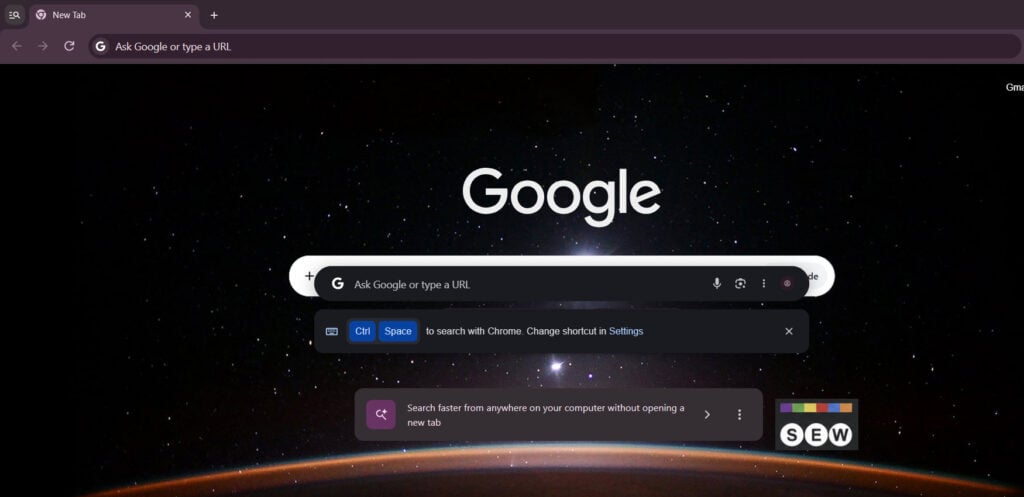
How this was written. Content Catalyst wrote this article with a language model from Search Engine Watch’s reporting (model: @cf/meta/llama-3.3-70b-instruct-fp8-fast); it describes that reporting rather than adding to it. The original, linked above, is the full story.
Key points from Search Engine Watch’s report
- Google is promoting a new floating search bar with AI Mode on Chrome's New Tab page to provide users with faster access to search capabilities.
- The feature, known internally as 'Everywhere Omnibox,' brings Google Search and AI Mode to a floating desktop interface.
- Users can customize their experience by changing the keyboard shortcut, always showing AI Mode, and displaying Chrome site shortcuts.
- The Chrome desktop search feature is currently available on Chrome Canary, but a release date for stable Chrome has not been announced.
- The introduction of the floating search bar may enhance user experience and signal a shift towards more integrated search capabilities in Chrome.
Google is introducing a new way for Chrome users to access Search and AI Mode from their desktops, according to Search Engine Watch. This feature, known internally as 'Everywhere Omnibox,' brings Google Search and AI Mode to a floating desktop interface. The goal is to provide users with a more convenient way to search without having to open a new tab.
The promotional card for the floating search bar is currently available on Chrome Canary for Windows, and it appears directly on the New Tab page. The card invites users to 'Search faster from anywhere on your computer without opening a new tab.' By clicking on the arrow, users can open the floating search bar in dark mode, which includes a Google Search box, an AI Mode button, and other features.
The floating search bar offers several functionalities, including the ability to revisit recent searches and check trending queries without visiting Google's homepage. Users can also use the microphone and Google Lens shortcut. Additionally, the search bar's context menu allows users to customize their experience by always showing AI Mode, displaying Chrome site shortcuts, and changing the keyboard shortcut.
Chrome shows Ctrl + Space as the default shortcut to open the floating search bar, but users can change this through the Settings link. The context menu also provides options to minimize or close the bar and open Settings. Furthermore, users have the option to dismiss the promotion by selecting 'Don't show this promo' from the three-dot menu.
This development is part of Google's efforts to enhance the desktop search experience, which also includes integrating AI Mode with the Windows taskbar. Search Engine Watch reported on Google's Chrome desktop search feature and its AI Mode integration earlier. The company is now promoting the desktop search experience directly on Chrome's New Tab page to increase visibility and adoption.
It is unclear when the Chrome desktop search feature will become available in stable Chrome, as Google has not announced a release date. The feature is currently available on Chrome Canary, which is a testing version of the browser. As Google continues to develop and promote its search and AI capabilities, users can expect to see more updates and improvements in the future.
The introduction of the floating search bar with AI Mode may signal a shift towards more integrated and accessible search capabilities in Chrome. As users become more accustomed to using AI-powered search features, Google may continue to expand and refine its offerings to meet growing demand. Search Engine Watch will provide updates on this development as more information becomes available.
Questions and answers
What is the 'Everywhere Omnibox' feature?
The 'Everywhere Omnibox' feature is a floating desktop interface that brings Google Search and AI Mode to Chrome users, allowing them to search faster from anywhere on their computer.
How can users access the floating search bar?
Users can access the floating search bar by clicking on the promotional card on Chrome's New Tab page or by using the default shortcut Ctrl + Space.
When will the Chrome desktop search feature be available in stable Chrome?
Google has not announced a release date for the Chrome desktop search feature in stable Chrome, but it is currently available on Chrome Canary.